


Of course! The dede:list tag is one of the most fundamental and frequently used tags in DedeCMS (织梦CMS). Its primary purpose is to list articles from a specific channel or category. The pagesize attribute is crucial for controlling how many articles are displayed on each page of the list.
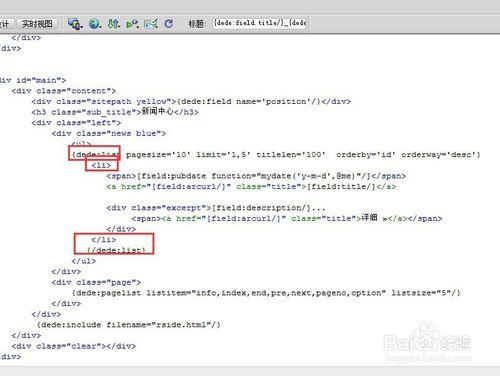
Here’s a comprehensive guide to the dede:list tag and the pagesize attribute.
What is pagesize?
The pagesize attribute sets the number of articles to display per page on a list page (e.g., list_article.htm).
When you have more articles than pagesize, DedeCMS automatically handles the pagination, creating links like "Page 1", "Page 2", "Next", etc., at the bottom of the list.
Basic Syntax
The dede:list tag is used within a list template file (e.g., list_article.htm).
{dede:list pagesize='20'}
    <li>
        <a href='[field:arcurl/]'>[field:title/]</a>
        <span>[field:pubdate function="MyDate('Y-m-d',@me)"/]</span>
    </li>
{/dede:list}
Explanation:
{dede:list pagesize='20'}: This opens the list loop and sets the page size to 20 articles per page.- The HTML and other DedeCMS tags inside this loop will be repeated for each article.
[field:arcurl/]: Displays the full URL of the article.[field:title/]: Displays the title of the article.[field:pubdate ... /]: Displays the publication date. Thefunctionis used to format the date into a "Y-m-d" (e.g., 2025-10-27) format.{/dede:list}: Closes the loop.
How to Use pagesize in Practice
Step 1: Edit the List Template
- Log in to your DedeCMS backend.
- Go to 模板 (Templates) -> 默认模板管理 (Default Template Management).
- Find the template file for your channel's list page. It's usually named
list_*.htm(e.g.,list_article.htmfor the article channel,list_product.htmfor a product channel). - Edit this file. Locate the
{dede:list}tag. - Add the
pagesizeattribute with your desired value.
Example: Displaying 10 articles per page
{dede:list pagesize='10'}
    <div class="post-item">
        <h2><a href="[field:arcurl/]" title="[field:title/]">[field:title/]</a></h2>
        <div class="post-meta">
            <span class="date">[field:pubdate function="MyDate('Y-m-d',@me)"]</span>
            <span class="category">Category: [field:typename/]</span>
        </div>
        <p class="excerpt">[field:description/]...</p>
    </div>
{/dede:list}
Step 2: (Optional) Adjust Pagination Settings
While pagesize controls the number of items per page, you might also want to control the pagination block itself. This is done using the {dede:pagelist} tag.
The {dede:pagelist} tag is usually placed right after the {dede:list} loop.
Example of a complete list page with pagination:
<html>
<head>{dede:field.title/}</title>
</head>
<body>
    <h1>{dede:field.title/}</h1>
    <!-- The article list -->
    {dede:list pagesize='10'}
        <div class="post-item">
            <h2><a href="[field:arcurl/]" title="[field:title/]">[field:title/]</a></h2>
            <div class="post-meta">
                <span class="date">[field:pubdate function="MyDate('Y-m-d',@me)"]</span>
            </div>
        </div>
    {/dede:list}
    <!-- The pagination links -->
    <div class="pagination">
        {dede:pagelist listsize='4' listitem='info,index,end,pre,next,pageno'}
        </div>
    </div>
</body>
</html>
Explanation of {dede:pagelist} attributes:
listsize='4': Shows 4 page numbers on each side of the current page.listitem='...': Controls which parts of the pagination to display.info: Shows info like "Total 50 articles, 5 pages".index: Shows "Home".pre: Shows "Previous".next: Shows "Next".end: Shows "Last".pageno: Shows the page numbers (e.g., 1, 2, 3).
Troubleshooting and Common Issues
Issue: pagesize is not working. The page shows all articles.
This is a very common problem. The reason is almost always a cache issue.
Solution: Clear the Cache.
- Clear the Site Cache: In the DedeCMS backend, go to 系统 (System) -> 系统基本参数设置 (System Basic Settings) -> 性能选项 (Performance Options) and click "Clear All Cache".
- Clear the Template Cache: Go to 模板 (Templates) -> 模板引擎管理 (Template Engine Management) and click "Clear All Cache".
- Clear the Browser Cache: Press
Ctrl + F5(orCmd + Shift + Ron Mac) to hard refresh your browser page.
After clearing the cache, the pagesize setting should take effect immediately.
Issue: The pagesize value is ignored and it's using a different value.
This can happen if you have multiple places defining the page size. DedeCMS has a system-level default.
Solution: Check the System Default.
- Go to 系统 (System) -> 系统基本参数设置 (System Basic Settings).
- Find the option named 列表每页显示行数 (Number of items displayed per page in lists).
- If you set a value here, it will be the default for all lists that don't explicitly use the
pagesizeattribute. Yourpagesize='10'in the template will override this default.
Summary
| Element | Purpose | Example |
|---|---|---|
{dede:list} |
The main loop for displaying a list of articles. | {dede:list ...} |
pagesize |
Attribute of {dede:list} to set items per page. |
{dede:list pagesize='15'} |
{dede:pagelist} |
Tag to display pagination links (Next, Previous, Page numbers). | {dede:pagelist ...} |
{dede:field.title/} |
Displays the title of the current category/channel. | <h1>{dede:field.title/}</h1> |
By correctly using the pagesize attribute within the {dede:list} tag and clearing the cache when needed, you can easily control how many articles are shown on each list page in your DedeCMS website.


