


Of course! The dede:autolink and dede:loop tags are fundamental for creating dynamic content blocks in DedeCMS. The if statement you're looking for is implemented using the if attribute within these tags, which is a very powerful and common feature.
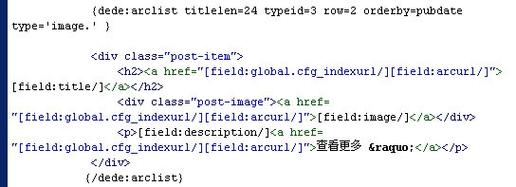
Here’s a detailed breakdown of how to use if conditions within dede:autoindex and dede:loop.
The Core Concept: The if Attribute
In DedeCMS template tags, the if attribute is used to check a specific condition. The tag's content (what's between the opening and closing tags) will only be rendered if the condition is true.
The syntax is:
[dede:tagname if='(condition)'] ...content... [/dede:tagname]
Using if with dede:autoindex
The dede:autoindex tag is designed to generate a list of links, typically for a site's navigation menu. The if attribute is perfect for controlling the appearance of individual list items, like adding a "current" class to the active page.

Common Use Case: Highlighting the Current Page
Let's say you want to add a class named active to the menu item that corresponds to the current page being viewed.
Template Code:
<ul class="nav-menu">
    {dede:channel type='top' currentstyle="
        <li class='active'><a href='~typelink~' ~rel~><span>~typename~</span></a></li>
    "}
        <li><a href='[field:typelink/]' [field:rel/]><span>[field:typename/]</span></a></li>
    {/dede:channel}
</ul>
Explanation:
dede:channel: This is the tag that lists the top-level channel categories.currentstyle='...': This is the key. It's a special attribute that tells DedeCMS what to do when it finds the channel that matches the current page.~typelink~: This is a placeholder that gets replaced by the actual link URL of the current channel.~rel~: This is a placeholder for therelattribute.~typename~: This is a placeholder for the channel's name.- The code inside
currentstylewill replace the default<li>...</li>for the active channel.
If you want to achieve a similar effect with a more manual if check, you can use the typeid parameter and the global typeid variable.
<ul class="nav-menu">
    {dede:channel type='top' typeid='0'}
        <li [field:global name=typeid runphp='yes']if(@me == @me) @me="class='active'";else @me="";[/field:global]>
            <a href='[field:typelink/]' [field:rel/]><span>[field:typename/]</span></a>
        </li>
    {/dede:channel}
</ul>
This second example is more complex but shows the power of PHP in templates. The runphp='yes' executes the PHP code inside. @me refers to the value of the variable (typeid in this case). It checks if the current channel's ID (@me) matches the global ID of the current page (@me). If they match, it sets the class attribute to active.
Using if with dede:loop
The dede:loop tag is used to loop through a result set from an arbitrary SQL query. This is where the if attribute becomes extremely useful for custom logic.
Common Use Case: Displaying Content Based on a Custom Field
Let's say you have a custom field in your article model named is_featured (a value like 1 for yes, 0 for no). You want to display a special "Featured" badge next to the title of featured articles.
Step 1: Ensure you have a custom field.
Go to DedeCMS后台 -> 核心 -> 内容模型管理 -> 选择你的模型(比如文章) -> 字段管理 and add a new field named is_featured.
Step 2: Use a SQL query with dede:loop.
Template Code:
<h2>Featured Articles</h2>
<ul class="featured-list">
    {dede:loop table='dede_archives' sort='pubdate' if='is_featured=1' row='5'}
        <li>
            <!-- This if condition checks the value of the custom field -->
            [field:if runphp='yes']
                if(@me['is_featured'] == 1) {
                    @me = "<span class='badge'>Featured</span> ";
                } else {
                    @me = "";
                }
            [/field:if]
            <a href="[field:arcurl/]">[field:title/]</a>
            <span class="date">([field:pubdate function="MyDate('Y-m-d',@me)"/])</span>
        </li>
    {/dede:loop}
</ul>
Explanation:
{dede:loop table='dede_archives' ...}: We are querying thedede_archivestable.if='is_featured=1': This is theifattribute on thelooptag itself. It filters the results from the database, so it only fetches articles where theis_featuredfield is1. This is the most efficient way to filter data at the database level.[field:if runphp='yes'] ... [/field:if]: This is an inline PHP block for a single field. It's a more advanced way to useif.@meinside this block refers to the current row's data (an associative array).@me['is_featured']accesses the value of theis_featuredcolumn for the current article.- The code checks if the value is
1. If true, it sets@meto the HTML for the badge. Otherwise, it sets it to an empty string. - The result of this PHP block is then rendered in the template.
Summary of if Usage
| Tag | if Attribute Location |
Purpose | Example |
|---|---|---|---|
dede:autoindex |
Not typically used directly on the tag. Logic is handled by currentstyle or by comparing typeid with a global variable. |
To style the currently active item in a navigation list. | currentstyle="<li class='active'>...</li>" |
dede:loop |
Directly on the tag (if='...') |
To filter records from the database before the loop starts. This is highly efficient. | if='arcrank > 0' (only show approved articles) |
[field:if] |
Inside any field tag (runphp='yes' required) |
To perform conditional logic on a single field's value within a loop. | Display a badge if price > 100. |
Best Practices
- Filter at the Database: Use the
ifattribute ondede:loopto filter your data in the SQL query (if='status=1'). This is much faster than fetching all records and then hiding them with PHP in the template. - Use
currentstylefor Navigation: For highlighting the current page in a menu, thecurrentstyleattribute ofdede:channelordede:autoclassis the cleanest and most intended method. - Keep PHP Simple: When using
runphp='yes', keep the PHP logic as simple as possible to avoid making your templates difficult to read and maintain.


