


Of course! The dede:arclist tag is one of the most powerful and frequently used tags in DedeCMS (织梦CMS). The if condition is not a separate tag itself, but rather an attribute used within the dede:arclist tag to filter the results based on specific criteria.
Here’s a complete guide on how to use if conditions with dede:arclist.
The Basic Structure
The if attribute in dede:arclist uses a simple fieldname='value' syntax. You can combine multiple conditions using AND or OR.
{dede:arclist if='condition'}
    <!-- Your HTML and field variables here -->
    <li>
        <a href="[field:arcurl/]">[field:title/]</a>
    </li>
{/dede:arclist}
Common if Conditions
Here are the most common use cases for the if attribute.
Filter by Category ID
Display articles only from a specific category or a list of categories.

Single Category:
{dede:arclist typeid='1' if='typeid==1'}
    <!-- Articles only from category ID 1 -->
{/dede:arclist}
Note: In this case, the typeid parameter already does the filtering, so the if attribute is redundant. It's better used for more complex conditions.
Multiple Categories (using IN):
{dede:arclist if='typeid IN (1,3,5)'}
    <!-- Articles from category ID 1, 3, or 5 -->
{/dede:arclist}
Filter by Article Status
This is very useful for distinguishing between different types of content.
Display Only "Recommendation" Articles (iscommend=1):
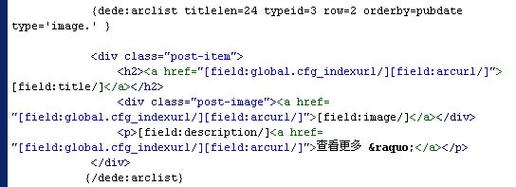
{dede:arclist if='iscommend==1'}
    <h3><a href="[field:arcurl/]">[field:title/]</a></h3>
    <p>[field:description/]...</p>
{/dede:arclist}
Display Only "Hot" Articles (onclick > a certain value):
{dede:arclist if='onclick>100'}
    <!-- Articles with more than 100 clicks -->
{/dede:arclist}
Display Only "Original" Articles (source==''):
{dede:arclist if='source==""'}
    <!-- Articles marked as original (source field is empty) -->
{/dede:arclist}
Filter by Custom Field (Channel Field)
This is one of the most powerful features. Let's assume you have a custom field named video_url (字段名: video_url).
Display Only Articles with a Video URL:
{dede:arclist if='video_url!=""'}
    <div class="video-item">
        <video src="[field:video_url/]" controls></video>
        <a href="[field:arcurl/]">[field:title/]</a>
    </div>
{/dede:arclist}
Display Only Articles with a Specific Custom Field Value:
{dede:arclist if='level=="VIP"'}
    <!-- Assuming you have a custom field named 'level' -->
{/dede:arclist}
Filter by Date and Time
You can filter articles based on their publication date.
Display Articles from Today:
{dede:arclist if='senddate > UNIX_TIMESTAMP()-86400'}
    <!-- Articles posted in the last 24 hours -->
{/dede:arclist}
UNIX_TIMESTAMP()gets the current timestamp.86400is the number of seconds in a day (24 60 60).
Display Articles from the Current Month:
{dede:arclist if='month=MONTH(NOW()) AND year=YEAR(NOW())'}
    <!-- Articles published in the current month -->
{/dede:arclist}
NOW()gets the current date and time.MONTH()andYEAR()are MySQL functions that DedeCMS can use.
Combining Conditions with AND and OR
You can build more complex queries.
AND Condition: Display articles that are both recommended AND from category 1.
{dede:arclist if='iscommend==1 AND typeid==1'}
    <!-- Recommended articles from category 1 -->
{/dede:arclist}
OR Condition: Display articles that are either recommended OR have more than 200 clicks.
{dede:arclist if='iscommend==1 OR onclick>200'}
    <!-- Recommended OR popular articles -->
{/dede:arclist}
Important Notes and Best Practices
-
Performance: Using
ifconditions on large datasets can be slow because the database fetches all matching articles first and then filters them in PHP. For the best performance, always use thetypeid,channelid,row,limit, etc., parameters to reduce the initial dataset size. -
Field Names are Case-Sensitive: The field names used in the
ifattribute (liketypeid,iscommend,source) must be in lowercase. -
String Values: When comparing to a string value (like for a custom field), you must use double quotes () inside the
ifattribute.- Correct:
if='level=="VIP"' - Incorrect:
if='level==VIP'
- Correct:
-
Boolean Values: For boolean fields like
iscommend(1 for true, 0 for false), you compare them to numbers.- Correct:
if='iscommend==1'
- Correct:
-
No
elseBlock: Thedede:arclisttag does not have a built-inelseblock. If you need to show different content for items that don't match the condition, you must use two separatearclistcalls or use PHP within your template (if enabled and configured).
Example: A Practical Use Case
Let's say you want to display a "Featured Products" section on your homepage. You have a custom field named is_featured (a checkbox field). You want to show only products where this box is checked.
- Create the custom field
is_featuredin the DedeCMS channel (e.g., the product channel). - Edit your homepage template (
index.htm). - Add the following code:
<!-- Featured Products Section -->
<h2>Featured Products</h2>
<ul class="product-list">
    {dede:arclist
        channelid='1'
        typeid='10'
        row='5'
        if='is_featured=="yes"'
    }
        <li>
            <a href="[field:arcurl/]">
                <img src="[field:litpic/]" alt="[field:title/]">
                <h3>[field:title/]</h3>
                <p class="price">¥[field:price/]</p>
            </a>
        </li>
    {/dede:arclist}
</ul>
In this example:
channelid='1': Specifies we are getting articles from channel 1 (e.g., the product channel).typeid='10': Limits the search to category ID 10.row='5': Shows only 5 results.if='is_featured=="yes"': This is the key. It filters the results to show only articles where the custom fieldis_featuredhas the value "yes". (Note: The value "yes" is what DedeCMS uses for checkbox fields by default).


