


Of course! Let's break down currentstyle in DedeCMS (织梦CMS). This is a fundamental and very useful feature for anyone working with DedeCMS templates.
What is currentstyle?
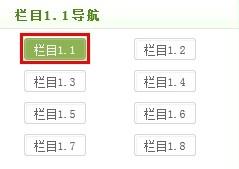
In simple terms, currentstyle is a DedeCMS built-in variable that allows you to automatically apply a specific CSS class or style to a navigation link or list item when it is the currently active page.
Its primary purpose is to create dynamic navigation menus where the "current" page stands out visually.
The Core Concept: {dede:field name='typename'/}
Before diving into currentstyle, you need to understand how DedeCMS identifies the "current" page. It does this using the {dede:field name='typename'/} tag.
- What it does: This tag outputs the name of the current channel or category.
- Where it's used: It's placed inside loop tags like
{dede:channel}or{dede:arclist}. - How it works: DedeCMS compares the name of the item in the loop with the name of the current page. If they match, that item is considered the "current" one.
currentstyle leverages this comparison to apply a style to the matching item.

How to Use currentstyle (The Syntax)
The syntax is used directly inside DedeCMS loop tags, most commonly {dede:channel} for navigation.
Syntax:
<a href='[field:typelink/]' [field:currentstyle runphp='yes']@me=("/<a[^>]*class=[\'\"](.*?)[\'\"][^>]*>(.*?)<\/a>/is", "\\1 current-item \\2", "@me");[/field:currentstyle]>[field:typename/]</a>
This looks complex, so let's break it down into a simpler, more common version.
Simplified and Common Usage
For most cases, you don't need the complex runphp logic. A much simpler and more readable syntax exists:
{dede:channel type='top'}
    <li>
        <a href="[field:typelink/]" [field:currentstyle=' class="active"' /]>
            [field:typename/]
        </a>
    </li>
{/dede:channel}
Explanation of the simplified version:
{dede:channel type='top'}: This is the loop that lists all top-level channels (main navigation categories).[field:typelink/]: This is the link to the category.[field:currentstyle=' class="active"' /]: This is the magic part.- If the current page matches this channel: DedeCMS will replace this entire tag with the value you provided:
class="active". - If it does NOT match: DedeCMS will replace this tag with nothing (an empty string).
- If the current page matches this channel: DedeCMS will replace this entire tag with the value you provided:
So, the final HTML output would look like this:
- For the "About Us" page (if you're on it):
<li> <a href="/about/" class="active"> About Us </a> </li> - For the "Services" page (if you're on the "About Us" page):
<li>
    <a href="/services/">
        Services
    </a>
</li>
You can then style the .active class in your CSS to make it stand out.
Practical Examples
Example 1: Main Website Navigation
This is the most common use case for a horizontal or vertical menu.
Template Code (head.htm):
<nav>
    <ul class="main-nav">
        {dede:channel type='top'}
            <li>
                <a href="[field:typelink/]" [field:currentstyle=' class="active"' /]>
                    [field:typename/]
                </a>
            </li>
        {/dede:channel}
        <!-- You can add static links like 'Home' manually -->
        <li><a href="{dede:global.cfg_basehost/}/">Home</a></li>
    </ul>
</nav>
CSS Code (style.css):
.main-nav a {
    display: block;
    padding: 10px 15px;
    color: #333;
    text-decoration: none;
    border-bottom: 2px solid transparent; /* For the active indicator */
}
.main-nav a:hover {
    color: #0066cc;
}
/* The style for the current page link */
.main-nav a.active {
    color: #0066cc;
    font-weight: bold;
    border-bottom-color: #0066cc;
}
Example 2: Sub-Navigation or Breadcrumb
You can also use currentstyle in nested loops to show sub-categories of the current page.
Template Code:
<div class="sub-nav">
    {dede:channel type='son' noself='yes'}
        <a href="[field:typelink/]" [field:currentstyle=' class="current-sub"' /]>
            [field:typename/]
        </a>
    {/dede:channel}
</div>
CSS Code:
.sub-nav a {
    margin-right: 10px;
    color: #666;
}
.sub-nav a.current-sub {
    color: #000;
    font-weight: bold;
}
Advanced Usage: The runphp Version
The complex syntax at the top is useful if you want to modify the entire <a> tag, not just add a class. For example, if you wanted to change the text or wrap it in a span.
{dede:channel type='top'}
    <li>
        [field:currentstyle runphp='yes']
            // If it's the current item, wrap the link in a span and add a class
            if(@me=='<a href="/about/">About Us</a>'){
                @me = '<span class="current-page">' . @me . '</span>';
            }
            // Otherwise, leave it as is
            else{
                @me = @me;
            }
        [/field:currentstyle]
    </li>
{/dede:channel}
While powerful, this is harder to maintain. The simplified class="active" method is almost always the best choice for standard navigation.
Summary
| Feature | Description |
|---|---|
| What it is | A DedeCMS variable to style the active navigation link. |
| How it works | It compares the loop item with the current page ({dede:field name='typename'}). |
| Simple Syntax | [field:currentstyle=' class="your-class"' /] |
| Best Use Case | Creating dynamic navigation menus where the current page is highlighted. |
| Result | Automatically adds a CSS class (e.g., class="active") to the <a> tag of the current page. |
By using currentstyle, you can make your DedeCMS websites more user-friendly and your navigation menus more dynamic without needing to manually edit the HTML for every single page.


