


我们将分步实现一个功能逐渐增强的 ls 程序。

(图片来源网络,侵删)
核心概念
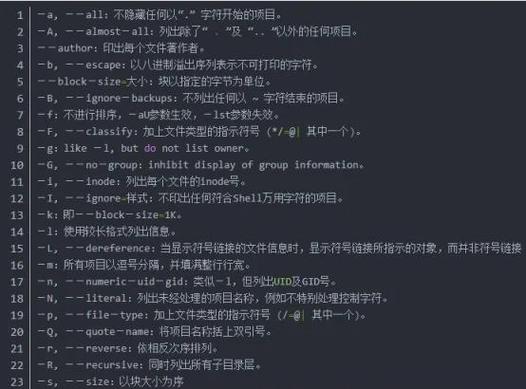
要实现 ls,我们需要与文件系统交互,在 Linux 中,这主要通过一系列系统调用来完成:
opendir(): 打开一个目录,返回一个DIR*类型的指针,类似于fopen()为文件返回FILE*。readdir(): 读取DIR*指向的目录中的一个条目,返回一个struct dirent*指针,每次调用都会返回下一个文件或子目录的信息,当到达目录末尾时,返回NULL。closedir(): 关闭一个已打开的目录。stat()或lstat(): 获取一个文件或符号链接的详细信息,这对于显示文件类型、大小、权限等至关重要。stat():如果文件是符号链接,它会跟随链接并指向最终文件的信息。lstat():它只获取符号链接本身的信息,不跟随链接,这对于实现ls -l并正确显示链接类型非常重要。
getpwuid(): 将用户 ID 转换为用户名(用于ls -l的所有者显示)。getgrgid(): 将组 ID 转换为组名(用于ls -l的所属组显示)。
struct dirent 是关键,它包含了文件名 d_name 和文件类型 d_type 等信息。
第一步:基础版 ls - 只列出文件名
这个版本的功能最简单,类似于 ls 不带任何参数。
代码: ls_basic.c
(图片来源网络,侵删)
#include <stdio.h>
#include <dirent.h>
int main(int argc, char *argv[]) {
    // 如果提供了参数,则使用参数作为目录名,否则使用当前目录 "."
    const char *dir_path = (argc > 1) ? argv[1] : ".";
    // 打开目录
    DIR *dir = opendir(dir_path);
    if (dir == NULL) {
        perror("无法打开目录");
        return 1;
    }
    struct dirent *entry;
    // 逐个读取目录中的条目
    while ((entry = readdir(dir)) != NULL) {
        // 打印文件名
        printf("%s\n", entry->d_name);
    }
    // 关闭目录
    closedir(dir);
    return 0;
}
如何编译和运行:
# 编译
gcc ls_basic.c -o ls_basic
# 运行,列出当前目录
./ls_basic
# 运行,列出 /etc 目录
./ls_basic /etc
代码解释:
- 我们检查
argc,如果用户提供了命令行参数(./ls_basic /tmp),我们就使用它作为目录路径,否则,默认使用 ,代表当前目录。 opendir(dir_path)尝试打开指定的目录,如果失败(例如目录不存在或没有权限),它会返回NULL,我们使用perror()打印一个友好的错误信息。readdir(dir)在一个循环中被反复调用,直到它返回NULL,这表示我们已经读完了目录中的所有条目。- 对于每个
entry,我们直接打印它的d_name成员。 - 使用
closedir(dir)释放资源。
第二步:进阶版 ls -l - 显示详细信息
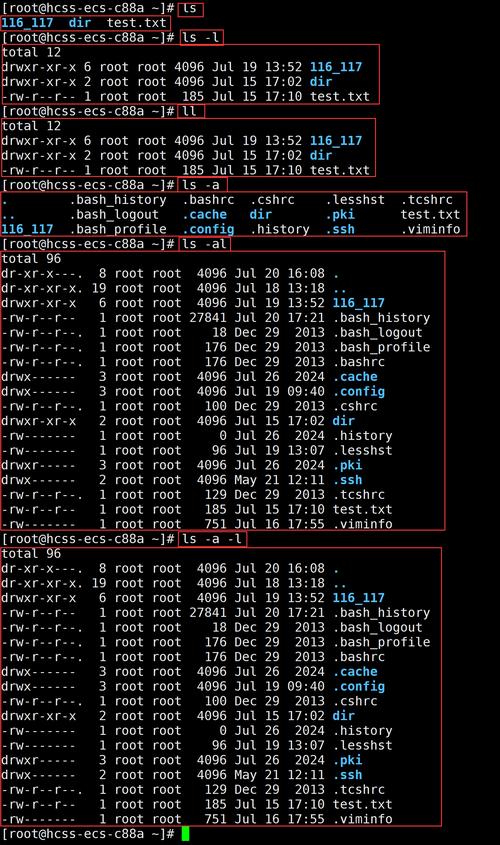
这是 ls 最核心的功能之一,我们需要使用 lstat() 来获取每个文件的元数据,并将其格式化输出。
代码: ls_l.c
(图片来源网络,侵删)
#include <stdio.h>
#include <stdlib.h>
#include <string.h>
#include <sys/types.h>
#include <sys/stat.h>
#include <dirent.h>
#include <pwd.h>   // 用于 getpwuid
#include <grp.h>   // 用于 getgrgid
#include <time.h>  // 用于 ctime
#include <unistd.h> // 用于 readlink
// 函数声明
void print_permissions(mode_t mode);
void print_file_type(mode_t mode);
int main(int argc, char *argv[]) {
    const char *dir_path = (argc > 1) ? argv[1] : ".";
    DIR *dir = opendir(dir_path);
    if (dir == NULL) {
        perror("无法打开目录");
        return 1;
    }
    struct dirent *entry;
    struct stat statbuf;
    // 读取目录中的每个条目
    while ((entry = readdir(dir)) != NULL) {
        // 构建文件的完整路径
        char full_path[PATH_MAX];
        snprintf(full_path, sizeof(full_path), "%s/%s", dir_path, entry->d_name);
        // 使用 lstat 获取文件信息,不跟随符号链接
        if (lstat(full_path, &statbuf) == -1) {
            perror("lstat 失败");
            continue; // 跳过这个文件
        }
        // 1. 文件类型和权限
        print_file_type(statbuf.st_mode);
        print_permissions(statbuf.st_mode);
        printf(" ");
        // 2. 硬链接数
        printf("%3ld ", statbuf.st_nlink);
        // 3. 所有者和所属组
        struct passwd *pw = getpwuid(statbuf.st_uid);
        struct group *gr = getgrgid(statbuf.st_gid);
        printf("%-8s %-8s ", pw ? pw->pw_name : "unknown", gr ? gr->gr_name : "unknown");
        // 4. 文件大小
        if (S_ISBLK(statbuf.st_mode) || S_ISCHR(statbuf.st_mode)) {
            printf("%3d, %3d ", major(statbuf.st_rdev), minor(statbuf.st_rdev));
        } else {
            printf("%8ld ", statbuf.st_size);
        }
        // 5. 最后修改时间
        char timebuf[80];
        strftime(timebuf, sizeof(timebuf), "%b %d %H:%M", localtime(&statbuf.st_mtime));
        printf("%s ", timebuf);
        // 6. 文件名
        // 如果是符号链接,显示链接目标
        if (S_ISLNK(statbuf.st_mode)) {
            char target[PATH_MAX];
            ssize_t len = readlink(full_path, target, sizeof(target) - 1);
            if (len != -1) {
                target[len] = '\0';
                printf("%s -> %s\n", entry->d_name, target);
            } else {
                printf("%s\n", entry->d_name);
            }
        } else {
            printf("%s\n", entry->d_name);
        }
    }
    closedir(dir);
    return 0;
}
// 打印文件类型
void print_file_type(mode_t mode) {
    if (S_ISREG(mode)) printf("-");
    else if (S_ISDIR(mode)) printf("d");
    else if (S_ISLNK(mode)) printf("l");
    else if (S_ISBLK(mode)) printf("b");
    else if (S_ISCHR(mode)) printf("c");
    else if (S_ISFIFO(mode)) printf("p");
    else if (S_ISSOCK(mode)) printf("s");
    else printf("?");
}
// 打印权限位
void print_permissions(mode_t mode) {
    printf( (mode & S_IRUSR) ? "r" : "-");
    printf( (mode & S_IWUSR) ? "w" : "-");
    printf( (mode & S_IXUSR) ? "x" : "-");
    printf( (mode & S_IRGRP) ? "r" : "-");
    printf( (mode & S_IWGRP) ? "w" : "-");
    printf( (mode & S_IXGRP) ? "x" : "-");
    printf( (mode & S_IROTH) ? "r" : "-");
    printf( (mode & S_IWOTH) ? "w" : "-");
    printf( (mode & S_IXOTH) ? "x" : "-");
}
如何编译和运行:
# 编译
gcc ls_l.c -o ls_l
# 运行
./ls_l
代码解释:
lstat(): 我们使用lstat()而不是stat(),这样当遇到符号链接时,我们得到的是链接本身的信息,而不是它指向的文件的信息,这对于正确显示l类型至关重要。- 完整路径:
readdir()只返回文件名,为了对文件进行lstat,我们需要构建从根目录到该文件的完整路径。snprintf是一个安全的方式来拼接字符串。 - 权限位解析:
st_mode是一个位掩码,包含了文件类型和权限信息,我们使用宏如S_ISDIR(mode)来判断类型,使用S_IRUSR,S_IWUSR等来判断权限位,并通过按位与操作&来检查每一位是否被设置。 - 用户和组信息:
st_uid和st_gid是数字 ID。getpwuid()和getgrgid()将这些 ID 转换为可读的用户名和组名,这些函数可能会返回NULL,所以我们做了检查。 - 设备文件: 对于块设备(如硬盘)和字符设备(如键盘),
st_size没有意义,而是用st_rdev来表示主次设备号。major()和minor()宏可以提取这两个号。 - 符号链接: 如果文件是符号链接(
S_ISLNK),我们使用readlink()系统调用来读取链接的目标路径,并在文件名后显示-> 目标路径。 - 时间格式化:
st_mtime是一个time_t类型(自纪元以来的秒数),我们使用localtime()将其转换为struct tm,然后用strftime格式化为更易读的月 日 时:分格式。
第三步:整合功能 - 支持多个参数和排序
一个完整的 ls 应该能处理多个目录,并且通常会对输出进行排序,我们还可以添加对 -a(显示隐藏文件)的支持。
代码: ls_final.c
#include <stdio.h>
#include <stdlib.h>
#include <string.h>
#include <sys/types.h>
#include <sys/stat.h>
#include <dirent.h>
#include <pwd.h>
#include <grp.h>
#include <time.h>
#include <unistd.h>
#include <fnmatch.h> // 用于 -i 忽略大小写
// 全局变量,用于存储排序后的文件列表
char **file_list = NULL;
int file_count = 0;
// 函数声明
void print_permissions(mode_t mode);
void print_file_type(mode_t mode);
void print_long_listing(const char *path, const char *name);
int compare_strings(const void *a, const void *b);
void process_directory(const char *dir_path, int show_all, int long_format);
int main(int argc, char *argv[]) {
    int show_all = 0;
    int long_format = 0;
    int i;
    // 简单的参数解析
    for (i = 1; i < argc; i++) {
        if (strcmp(argv[i], "-a") == 0) {
            show_all = 1;
        } else if (strcmp(argv[i], "-l") == 0) {
            long_format = 1;
        }
    }
    // 如果没有提供目录参数,则处理当前目录
    if (argc <= 1 + (show_all ? 1 : 0) + (long_format ? 1 : 0)) {
        process_directory(".", show_all, long_format);
    } else {
        // 否则,处理所有非参数的目录
        for (i = 1; i < argc; i++) {
            if (argv[i][0] != '-') {
                process_directory(argv[i], show_all, long_format);
            }
        }
    }
    // 释放内存
    if (file_list) {
        for (i = 0; i < file_count; i++) {
            free(file_list[i]);
        }
        free(file_list);
    }
    return 0;
}
void process_directory(const char *dir_path, int show_all, int long_format) {
    DIR *dir = opendir(dir_path);
    if (dir == NULL) {
        perror(dir_path);
        return;
    }
    struct dirent *entry;
    file_count = 0;
    file_list = NULL;
    // 第一次遍历:收集所有文件名
    while ((entry = readdir(dir)) != NULL) {
        if (!show_all && entry->d_name[0] == '.') {
            continue; // 跳过隐藏文件
        }
        file_list = realloc(file_list, (file_count + 1) * sizeof(char*));
        file_list[file_count] = strdup(entry->d_name);
        file_count++;
    }
    closedir(dir);
    // 排序文件列表
    qsort(file_list, file_count, sizeof(char*), compare_strings);
    // 第二次遍历:打印文件
    for (int i = 0; i < file_count; i++) {
        if (long_format) {
            print_long_listing(dir_path, file_list[i]);
        } else {
            printf("%s\n", file_list[i]);
        }
    }
    // 在处理多个目录时,打印一个换行符分隔
    if (file_count > 0) {
        printf("\n");
    }
}
void print_long_listing(const char *dir_path, const char *name) {
    char full_path[PATH_MAX];
    snprintf(full_path, sizeof(full_path), "%s/%s", dir_path, name);
    struct stat statbuf;
    if (lstat(full_path, &statbuf) == -1) {
        perror("lstat 失败");
        return;
    }
    print_file_type(statbuf.st_mode);
    print_permissions(statbuf.st_mode);
    printf(" %3ld ", statbuf.st_nlink);
    struct passwd *pw = getpwuid(statbuf.st_uid);
    struct group *gr = getgrgid(statbuf.st_gid);
    printf("%-8s %-8s ", pw ? pw->pw_name : "unknown", gr ? gr->gr_name : "unknown");
    if (S_ISBLK(statbuf.st_mode) || S_ISCHR(statbuf.st_mode)) {
        printf("%3d, %3d ", major(statbuf.st_rdev), minor(statbuf.st_rdev));
    } else {
        printf("%8ld ", statbuf.st_size);
    }
    char timebuf[80];
    strftime(timebuf, sizeof(timebuf), "%b %d %H:%M", localtime(&statbuf.st_mtime));
    printf("%s ", timebuf);
    if (S_ISLNK(statbuf.st_mode)) {
        char target[PATH_MAX];
        ssize_t len = readlink(full_path, target, sizeof(target) - 1);
        if (len != -1) {
            target[len] = '\0';
            printf("%s -> %s\n", name, target);
        } else {
            printf("%s\n", name);
        }
    } else {
        printf("%s\n", name);
    }
}
// ... (compare_strings, print_file_type, print_permissions 函数与 ls_l.c 中相同) ...
如何编译和运行:
# 编译
gcc ls_final.c -o ls_final
# 运行,列出当前目录,包括隐藏文件
./ls_final -a
# 运行,以长格式列出 /etc 和 /home 目录
./ls_final -l /etc /home
# 运行,以长格式、包含隐藏文件的方式列出当前目录
./ls_final -la
代码解释:
- 参数解析: 我们增加了一个简单的循环来处理
-a和-l标志。 - 处理多个目录:
main函数现在会检查参数,如果参数不是-a或-l,就把它当作一个目录路径来处理。 process_directory函数: 这个函数封装了处理单个目录的所有逻辑。- 收集和排序: 它首先读取目录中的所有文件名(根据
-a决定是否包含隐藏文件),并将它们存入一个动态增长的字符串数组file_list中,然后调用qsort对这个数组进行排序。compare_strings是一个简单的字符串比较函数,用作qsort的比较器。 - 打印: 排序完成后,它再次遍历
file_list,并根据-l标志决定是调用print_long_listing还是简单打印文件名。
- 收集和排序: 它首先读取目录中的所有文件名(根据
- 内存管理: 使用
strdup复制文件名,使用realloc动态扩展数组,在程序结束时,记得使用free释放所有分配的内存,防止内存泄漏。
通过这三个步骤,我们实现了一个功能相当完备的简化版 ls 命令,这个项目展示了 C 语言如何与操作系统底层进行交互,是学习 Linux 系统编程的绝佳实践。
你可以基于这个版本继续扩展功能,
-R(递归):遍历子目录。-i(显示 inode 号):从stat结构中获取st_ino。-t(按时间排序):修改compare_strings函数,比较statbuf.st_mtime。-h(人类可读的文件大小):将字节转换为 KB, MB, GB。


