


Linux 中的文件操作主要分为两大类:

(图片来源网络,侵删)
- 低级 I/O (Unbuffered I/O):也称为系统调用,直接与内核交互,效率高,但每次操作都会涉及系统调用开销,编程接口更原始(使用文件描述符
int类型)。 - 高级 I/O (Buffered I/O):也称为标准 I/O 库,在用户空间提供了缓冲机制,减少了系统调用的次数,更方便、更安全(使用
FILE*指针)。
对于绝大多数应用场景,我们都推荐使用高级 I/O (标准 I/O 库),除非你有特殊需求(如追求极致性能或进行某些底层开发)。
低级 I/O (系统调用)
这部分函数在 <unistd.h> 头文件中声明。
核心概念:文件描述符
- 是什么:一个非负整数,是内核为了高效管理已打开的文件而创建的索引。
- 范围:在进程中,
0,1,2是三个标准文件描述符,默认已经打开:0:标准输入1:标准输出2:标准错误
- 获取:后续打开的文件描述符会从
3开始,按顺序递增。
主要函数
open() - 打开或创建文件
#include <fcntl.h>
#include <sys/stat.h>
#include <sys/types.h>
#include <unistd.h>
int open(const char *pathname, int flags, mode_t mode);
- 参数:
pathname: 文件路径。flags: 打开文件的方式,必须包含以下一种或多种(使用 组合):O_RDONLY: 只读O_WRONLY: 只写O_RDWR: 读写O_CREAT: 如果文件不存在,则创建它。(需要mode参数)O_EXCL: 与O_CREAT一起使用,如果文件已存在则返回错误。O_TRUNC: 如果文件存在且以只写或读写方式成功打开,则清空文件内容。O_APPEND: 每次写入都追加到文件末尾。
mode: 当使用O_CREAT时,指定文件的权限(如0644),注意,这个权限会受到进程umask值的影响。
- 返回值:
- 成功:返回一个新的文件描述符(一个非负整数)。
- 失败:返回
-1,并设置errno。
read() - 从文件读取数据
#include <unistd.h>
ssize_t read(int fd, void *buf, size_t count);
- 参数:
fd: 文件描述符。buf: 存储读取数据的缓冲区。count: 请求读取的最大字节数。
- 返回值:
- 成功:返回实际读取到的字节数,如果到文件末尾,返回
0。 - 失败:返回
-1,并设置errno。
- 成功:返回实际读取到的字节数,如果到文件末尾,返回
write() - 向文件写入数据
#include <unistd.h>
ssize_t write(int fd, const void *buf, size_t count);
- 参数:
fd: 文件描述符。buf: 包含要写入数据的缓冲区。count: 要写入的字节数。
- 返回值:
- 成功:返回实际写入的字节数。
- 失败:返回
-1,并设置errno。
close() - 关闭文件描述符
#include <unistd.h>
int close(int fd);
- 参数:
fd:要关闭的文件描述符。 - 返回值:
- 成功:返回
0。 - 失败:返回
-1,并设置errno。
- 成功:返回
lseek() - 移动文件读写指针
#include <sys/types.h>
#include <unistd.h>
off_t lseek(int fd, off_t offset, int whence);
- 参数:
fd: 文件描述符。offset: 偏移量。whence: 起始位置:SEEK_SET: 从文件开头计算。SEEK_CUR: 从当前读写指针位置计算。SEEK_END: 从文件末尾计算。
- 返回值:
- 成功:返回新的文件读写指针位置(相对于文件开头的字节偏移量)。
- 失败:返回
(off_t)-1,并设置errno。
高级 I/O (标准 I/O 库)
这部分函数在 <stdio.h> 头文件中声明。
核心概念:文件流
- 是什么:一个指向
FILE结构体的指针(FILE*)。FILE结构体包含了文件描述符、缓冲区、当前读写位置等信息。 - 优势:提供了全缓冲、行缓冲和无缓冲三种模式,减少了直接调用
read/write的次数,提高了效率,并提供了格式化 I/O 功能(如printf,scanf)。
主要函数
fopen() - 打开文件
#include <stdio.h>
FILE *fopen(const char *pathname, const char *mode);
- 参数:
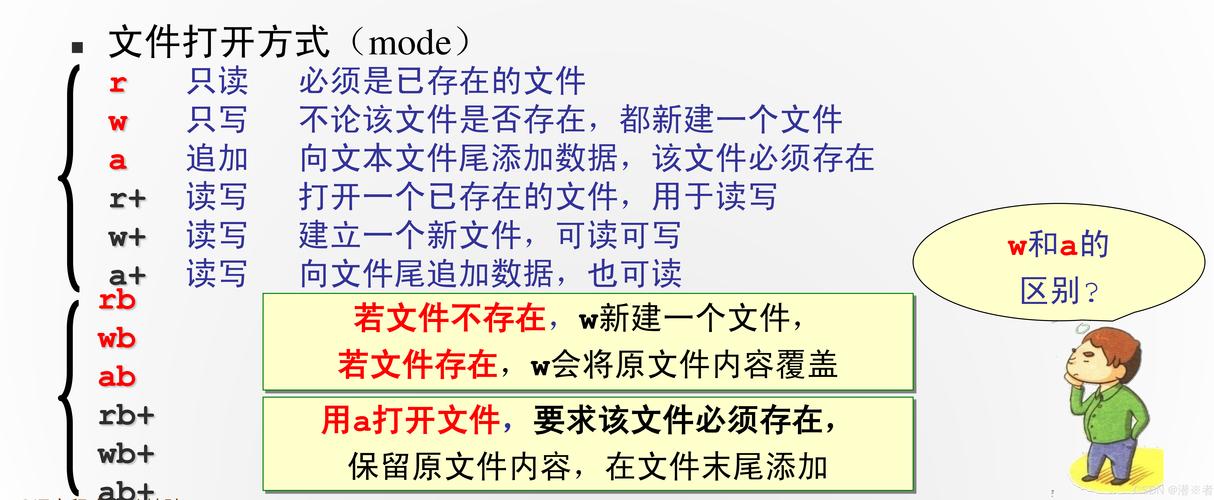
pathname: 文件路径。mode: 打开模式:"r": 只读,文件必须存在。"w": 只写,文件若存在则清空,不存在则创建。"a": 追加,文件若不存在则创建,写入内容追加到末尾。"r+": 读写,文件必须存在。"w+": 读写,文件若存在则清空,不存在则创建。"a+": 读写,文件若不存在则创建,写入内容追加到末尾。
- 返回值:
- 成功:返回
FILE*指针。 - 失败:返回
NULL。
- 成功:返回
fread() - 从文件流读取数据
#include <stdio.h>
size_t fread(void *ptr, size_t size, size_t nmemb, FILE *stream);
- 参数:
ptr: 存储读取数据的缓冲区。size: 每个数据项的大小(字节)。nmemb: 要读取的数据项数量。stream: 文件流指针。
- 返回值:成功读取的数据项的数量(不是字节数),如果到文件末尾或出错,可能小于
nmemb。
fwrite() - 向文件流写入数据
#include <stdio.h>
size_t fwrite(const void *ptr, size_t size, size_t nmemb, FILE *stream);
- 参数:同
fread。 - 返回值:成功写入的数据项的数量。
fclose() - 关闭文件流
#include <stdio.h>
int fclose(FILE *stream);
fgetc() / fputc() - 读写单个字符
#include <stdio.h>
int fgetc(FILE *stream); // 读取一个字符
int fputc(int c, FILE *stream); // 写入一个字符
fgets() / fputs() - 读写一行字符串
#include <stdio.h>
char *fgets(char *s, int size, FILE *stream); // 读取一行
int fputs(const char *s, FILE *stream); // 写入一行
fscanf() / fprintf() - 格式化读写
#include <stdio.h>
int fscanf(FILE *stream, const char *format, ...); // 从文件流格式化读取
int fprintf(FILE *stream, const char *format, ...); // 向文件流格式化写入
fseek() / ftell() - 移动和获取文件指针
#include <stdio.h>
int fseek(FILE *stream, long offset, int whence);
long ftell(FILE *stream);
fseek与lseek类似,但参数是long类型。ftell用于获取当前文件指针的位置(相对于文件开头)。
rewind() - 重置文件指针
#include <stdio.h>
void rewind(FILE *stream);
- 相当于
fseek(stream, 0, SEEK_SET)。
fflush() - 刷新缓冲区
#include <stdio.h>
int fflush(FILE *stream);
- 将缓冲区中的数据立即写入文件,对于输出流,
fflush(NULL)会刷新所有打开的输出流。
错误处理
在文件操作中,错误处理至关重要。
(图片来源网络,侵删)
- 系统调用:失败时返回
-1,全局变量errno会被设置为一个特定的错误码(如ENOENT表示文件不存在),需要包含<errno.h>。 - 标准 I/O 库:失败时通常返回
NULL或EOF,可以通过perror()函数打印出系统描述的错误信息,或者使用strerror(errno)将错误码转换为字符串。
示例代码:
#include <stdio.h>
#include <errno.h>
#include <string.h>
int main() {
    FILE *fp = fopen("non_existent_file.txt", "r");
    if (fp == NULL) {
        // 使用 perror 打印 "fopen: No such file or directory"
        perror("fopen");
        // 或者使用 strerror
        // fprintf(stderr, "Error opening file: %s\n", strerror(errno));
        return 1;
    }
    // ... 正常操作 ...
    fclose(fp);
    return 0;
}
综合示例
示例 1:使用标准 I/O 库复制文件 (推荐方式)
#include <stdio.h>
#define BUFFER_SIZE 4096
int main(int argc, char *argv[]) {
    if (argc != 3) {
        fprintf(stderr, "Usage: %s <source> <destination>\n", argv[0]);
        return 1;
    }
    FILE *src_fp = fopen(argv[1], "rb"); // "rb" for binary read, to avoid newline translation
    if (src_fp == NULL) {
        perror("fopen source");
        return 1;
    }
    FILE *dest_fp = fopen(argv[2], "wb"); // "wb" for binary write
    if (dest_fp == NULL) {
        perror("fopen destination");
        fclose(src_fp); // 确保关闭已打开的源文件
        return 1;
    }
    char buffer[BUFFER_SIZE];
    size_t bytes_read;
    // 循环读取直到文件末尾
    while ((bytes_read = fread(buffer, 1, BUFFER_SIZE, src_fp)) > 0) {
        // 将读取到的字节写入目标文件
        size_t bytes_written = fwrite(buffer, 1, bytes_read, dest_fp);
        if (bytes_written != bytes_read) {
            perror("fwrite");
            break; // 写入出错,跳出循环
        }
    }
    if (ferror(src_fp)) {
        perror("fread");
    }
    // 关闭文件
    fclose(src_fp);
    fclose(dest_fp);
    printf("File copied successfully.\n");
    return 0;
}
示例 2:使用系统调用复制文件
#include <fcntl.h>
#include <unistd.h>
#include <stdio.h>
#include <errno.h>
#include <string.h>
#define BUFFER_SIZE 4096
int main(int argc, char *argv[]) {
    if (argc != 3) {
        fprintf(stderr, "Usage: %s <source> <destination>\n", argv[0]);
        return 1;
    }
    int src_fd = open(argv[1], O_RDONLY);
    if (src_fd == -1) {
        perror("open source");
        return 1;
    }
    // O_CREAT | O_WRONLY | O_TRUNC: 如果文件不存在则创建,只写,如果存在则清空
    // 0644: 文件权限 (所有者读写,组和其他用户只读)
    int dest_fd = open(argv[2], O_CREAT | O_WRONLY | O_TRUNC, 0644);
    if (dest_fd == -1) {
        perror("open destination");
        close(src_fd);
        return 1;
    }
    char buffer[BUFFER_SIZE];
    ssize_t bytes_read;
    while ((bytes_read = read(src_fd, buffer, BUFFER_SIZE)) > 0) {
        ssize_t bytes_written = write(dest_fd, buffer, bytes_read);
        if (bytes_written == -1) {
            perror("write");
            break;
        }
    }
    if (bytes_read == -1) {
        perror("read");
    }
    close(src_fd);
    close(dest_fd);
    printf("File copied successfully.\n");
    return 0;
}
总结与最佳实践
| 特性 | 低级 I/O (系统调用) | 高级 I/O (标准 I/O 库) |
|---|---|---|
| 头文件 | <unistd.h>, <fcntl.h> |
<stdio.h> |
| 核心对象 | 文件描述符 (int) |
文件流 (FILE*) |
| 缓冲机制 | 无缓冲 | 有缓冲 (全/行/无) |
| 效率 | 单次操作快,但频繁调用效率低 | 高,因为减少了系统调用次数 |
| 易用性 | 较低,需要手动管理 | 高,提供丰富的格式化 I/O 函数 |
| 适用场景 | 设备文件、管道、套接字、追求极致性能 | 几乎所有常规的磁盘文件操作 |
最佳实践建议:
- 优先使用标准 I/O 库 (
fopen,fread,fwrite等):除非你有充分的理由(如性能瓶颈或特殊设备操作),否则应始终使用标准 I/O 库,它更安全、更方便、效率也足够高。 - 检查所有函数的返回值:这是编写健壮 C 程序的基本要求,永远不要假设文件操作会成功。
- 处理错误信息:使用
perror或strerror为用户提供有意义的错误信息,方便调试。 - 始终关闭文件:使用
fclose或close释放资源,避免文件描述符泄漏,在open/fopen成功后,后续操作失败时,要记得关闭之前已成功打开的文件。 - 使用合适的缓冲区大小:在进行大文件复制或读写时,使用一个较大的缓冲区(如 4KB 或 8KB)可以显著提高性能,因为它减少了 I/O 操作的次数。
(图片来源网络,侵删)


