


Of course! The dede:arclist tag is one of the most powerful and frequently used tags in DedeCMS (织梦内容管理系统). It's used to call and display lists of articles, making it essential for creating homepage news lists, article columns, and more.
Let's break down the type attribute in detail, as it's one of the most important for controlling what content appears in your list.
What is dede:arclist?
First, a quick overview. dede:arclist is a loop tag that retrieves a list of articles from the DedeCMS database. Its basic structure looks like this:
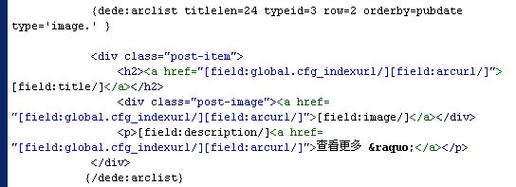
{dede:arclist typeid='' row='' titlelen=''}
    <a href="[field:arcurl/]">[field:title/]</a>
    <span>[field:pubdate function='MyDate("Y-m-d",@me)'/]</span>
    <p>[field:description function='cn_substr(@me, 80)'/]...</p>
{/dede:arclist}
The typeid Attribute (The "Type" You Might Be Thinking Of)
Before we dive into the type attribute, it's crucial to understand typeid, as it's often confused and is more fundamental for filtering content.
- Purpose:
typeidspecifies which channel or category's articles to display. - Value: It accepts the ID number of a channel or category.
- How to Find the ID:
- Go to your DedeCMS backend.
- Navigate to "核心" -> "频道模型" -> "频道管理".
- Hover your mouse over the channel or category you want. The ID will appear in the URL at the bottom of your browser (e.g.,
typeid=8).
- Usage:
- Single Category:
typeid='8'will only show articles from the category with ID 8. - Multiple Categories:
typeid='8,10,12'will show articles from categories 8, 10, and 12. - All Sub-Categories:
typeid='8,0'will show articles from category 8 and all of its sub-categories. This is very useful for primary navigation.
- Single Category:
If you don't set typeid, arclist will default to showing articles from the current channel you are on.
The type Attribute (The Main Focus)
The type attribute is different from typeid. It's used to filter the articles within the selected categories based on their properties or status. It accepts a comma-separated list of letters.
Here are the most common and useful values for type:
type='image' (or img)
- Purpose: Only display articles that have a thumbnail image.
- How it works: DedeCMS requires you to set a thumbnail for an article during or after creation. This tag filters for only those articles.
- Common Use Case: Creating a visual news ticker or a gallery-style homepage section.
type='commend' (or iscommend, t)
- Purpose: Only display articles that have been marked as "commended" or "featured".
- How it works: In the article's editing page, there is a checkbox for "推荐选项" (Commend Options). Checking this box adds the article to the
dede_archivestable'siscommendfield. - Common Use Case: Creating a "Featured News" or "Editor's Pick" section on your homepage.
type='hot' (or hotart, h)
- Purpose: Only display articles that have been marked as "hot".
- How it works: Similar to
commend, there is a "hot" checkbox in the article's editing page. - Common Use Case: Creating a "Trending Now" or "Popular Articles" section.
type='spec' (or spec, s)
- Purpose: Only display articles that belong to a special topic.
- How it works: This relates to the "专题" (Special Topic) feature in DedeCMS. Articles added to a topic are marked with this flag.
- Common Use Case: Highlighting articles that are part of a specific, temporary campaign or series.
type='top' (or top)
- Purpose: Only display articles that are "topped" or "sticky".
- How it works: This is for articles that you want to appear at the very top of the list, regardless of their publish date. You can set this in the article's editing page or by using the "Top Status" option.
- Common Use Case: Creating a permanent announcement section that always appears first.
Combining typeid and type
The real power of dede:arclist comes from combining typeid and type.
Example Scenario: You want to create a "Featured Technology News" section on your homepage.
- You have a main "Technology" category with
typeid=15. - Within that category, you have several articles you've marked as "commended".
Your tag would look like this:
<h2>Featured Technology News</h2>
<ul>
    {dede:arclist typeid='15' type='commend' row='5' titlelen='40'}
        <li>
            <a href="[field:arcurl/]" title="[field:title/]">
                [field:title/]
            </a>
            <span class="date">[field:pubdate function='MyDate("m-d",@me)'/]</span>
        </li>
    {/dede:arclist}
</ul>
Explanation:
typeid='15': Limits the pool of articles to only those in the "Technology" category (and its sub-categories).type='commend': Further filters that pool to show only the articles you've marked as "featured".row='5': Limits the output to 5 articles.len='40'`: Shortens the title to a maximum of 40 characters.
Other Important arclist Attributes
While focusing on type, it's helpful to know these other key attributes:
| Attribute | Description | Example |
|---|---|---|
row |
The number of articles to display. | row='10' |
infolen |
The length of the article summary (in characters). | infolen='120' |
orderby |
The sorting order of the articles. Common values: pubdate (publish date), click (click count), id. |
orderby='click' |
orderway |
The sort direction: desc (descending) or asc (ascending). |
orderway='desc' |
subday |
Only show articles from the last N days. |
subday='7' (last 7 days) |
channel |
The ID of the specific channel to pull from (overrides typeid in some contexts). |
channel='1' |
Summary
| Attribute | Main Function | Common Values |
|---|---|---|
typeid |
Which category/channel to get articles from. | 8, 8,10, 8,0 (ID numbers) |
type |
What kind of articles to get from that category. | image, commend, hot, top, spec (letters) |
In short: Use typeid to define the source of your articles and type to define the filter for those articles. Mastering this combination is key to building dynamic and well-organized websites with DedeCMS.


