


我将为你详细介绍几种在不同环境下创建定时器的方法,从最通用的 POSIX 系统到 Windows,再到一些跨平台的库。
(图片来源网络,侵删)
概览
| 方法/环境 | 适用平台 | 核心机制 | 优点 | 缺点 |
|---|---|---|---|---|
POSIX setitimer |
Linux, macOS, Unix | 信号 | 精度高,系统级,适合进程内定时 | 信号处理函数限制多,不能调用非异步安全函数 |
POSIX timer_create |
Linux, macOS, Unix | POSIX 实时信号 | 功能强大,可指定信号,线程安全 | 相对复杂,需要理解 POSIX 实时扩展 |
Windows CreateTimerQueueTimer |
Windows | 线程池回调 | 非常灵活,易于集成到 Windows 应用 | 仅限 Windows 平台 |
| 跨平台库 (libuv, Boost.Asio) | 跨平台 | 事件循环 | 代码可移植性好,适合异步 I/O 应用 | 需要引入外部库 |
POSIX 系统 (Linux, macOS, Unix) 中的定时器
POSIX 提供了多种定时器机制,setitimer 是最常见的一种,而 timer_create 是更现代、功能更强大的 POSIX 实时扩展。
方法 A: 使用 setitimer (最常用)
setitimer 为调用进程设置一个定时器,时间到达时会产生一个信号。
核心流程:
- 定义信号处理函数:当定时器到期时,操作系统会向你的进程发送一个信号(如
SIGALRM),你需要提供一个处理这个信号的函数。 - 设置信号处理:使用
signal()或更安全的sigaction()函数来告诉系统,收到信号时该执行哪个函数。 - 配置定时器:调用
setitimer()来启动定时器。 - 进入等待状态:主程序需要进入某种等待状态(如
pause()、sleep()或sigsuspend()),或者被信号中断。
示例代码:

(图片来源网络,侵删)
#include <stdio.h>
#include <stdlib.h>
#include <unistd.h>
#include <signal.h>
#include <sys/time.h>
// 全局变量,用于记录定时器触发的次数
volatile int timer_count = 0;
// 信号处理函数
void timer_handler(int signo) {
    if (signo == SIGALRM) {
        timer_count++;
        printf("Timer expired! Count: %d\n", timer_count);
    }
}
int main() {
    struct itimerval timer;
    // 1. 设置信号处理函数
    if (signal(SIGALRM, timer_handler) == SIG_ERR) {
        perror("Unable to catch SIGALRM");
        exit(1);
    }
    // 2. 初始化定时器结构体
    // 设置首次触发的时间为 2 秒
    timer.it_value.tv_sec = 2;
    timer.it_value.tv_usec = 0;
    // 设置之后每次触发的时间为 1 秒 (周期性)
    timer.it_interval.tv_sec = 1;
    timer.it_interval.tv_usec = 0;
    // 3. 启动定时器
    // ITIMER_REAL: 使用真实时间,发送 SIGALRM 信号
    if (setitimer(ITIMER_REAL, &timer, NULL) == -1) {
        perror("Error calling setitimer()");
        exit(1);
    }
    printf("Timer started. The program will print a message every 1 second after an initial 2-second delay.\n");
    printf("Press Ctrl+C to stop.\n");
    // 4. 主程序进入循环,等待信号
    // pause() 会使进程挂起,直到收到一个信号
    while (1) {
        pause();
    }
    return 0;
}
编译和运行:
gcc -o timer_setitimer timer_setitimer.c
./timer_setitimer
方法 B: 使用 timer_create (更现代、线程安全)
timer_create 创建一个 POSIX 定时器,并为其关联一个特定的实时信号,这比 setitimer 更灵活,并且是线程安全的。
核心流程:
- 创建定时器:调用
timer_create(),它会返回一个定时器 ID (timer_t)。 - 设置定时器属性:填充
struct sigevent,指定定时器到期时如何通知你的程序(通常是发送一个信号)。 - 启动定时器:调用
timer_settime()来启动或修改定时器。 - 等待信号:使用
sigwait()或在信号处理函数中处理。
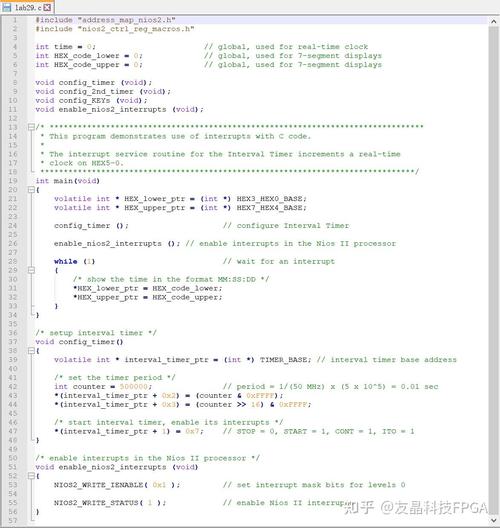
示例代码:
(图片来源网络,侵删)
#include <stdio.h>
#include <stdlib.h>
#include <unistd.h>
#include <signal.h>
#include <time.h>
#include <string.h>
#define handle_error(msg) \
    do { perror(msg); exit(EXIT_FAILURE); } while (0)
timer_t timer_id;
// 信号处理函数
void handler(int sig, siginfo_t *si, void *uc) {
    // si->si_value.sival_ptr 指向 timer_create 时传入的值
    printf("Caught signal %d\n", sig);
    timer_t *tidptr = si->si_value.sival_ptr;
    printf("    timer ID is %ld\n", (long) *tidptr);
    printf("    timer_getoverrun() = %d\n", timer_getoverrun());
}
int main() {
    struct sigevent sev;
    struct sigaction sa;
    struct itimerspec its;
    sigset_t waitmask;
    // 1. 设置信号处理函数
    sa.sa_flags = SA_SIGINFO;
    sa.sa_sigaction = handler;
    sigemptyset(&sa.sa_mask);
    if (sigaction(SIGRTMIN, &sa, NULL) == -1)
        handle_error("sigaction");
    // 2. 创建定时器
    sev.sigev_notify = SIGEV_SIGNAL; // 定时器到期时发送信号
    sev.sigev_signo = SIGRTMIN;      // 使用实时信号 SIGRTMIN
    sev.sigev_value.sival_ptr = &timer_id; // 传递给信号处理函数的值
    if (timer_create(CLOCK_REALTIME, &sev, &timer_id) == -1)
        handle_error("timer_create");
    printf("timer ID is %ld\n", (long) timer_id);
    // 3. 启动定时器
    // 首次触发时间为 3 秒
    its.it_value.tv_sec = 3;
    its.it_value.tv_nsec = 0;
    // 之后每 2 秒触发一次
    its.it_interval.tv_sec = 2;
    its.it_interval.tv_nsec = 0;
    if (timer_settime(timer_id, 0, &its, NULL) == -1)
        handle_error("timer_settime");
    // 4. 等待信号
    sigemptyset(&waitmask);
    sigaddset(&waitmask, SIGRTMIN);
    printf("Waiting for timer signal...\n");
    while(1) {
        // sigwait 会阻塞等待,直到信号出现
        // 这比 pause() 更可控,因为它不会中断其他信号
        sigwait(&waitmask, NULL);
    }
    exit(EXIT_SUCCESS);
}
编译和运行:
gcc -o timer_create timer_create.c -lrt
./timer_create
注意: 在 Linux 上,链接 POSIX 实时库时可能需要加上
-lrt选项。
Windows 系统中的定时器
Windows 提供了多种定时器机制,CreateTimerQueueTimer 是一种非常灵活和常用的方式,因为它利用了线程池,不会阻塞主线程。
使用 CreateTimerQueueTimer
核心流程:
- 创建定时器队列:虽然不是必须的,但创建一个队列是良好实践。
- 定义回调函数:这是一个普通的函数,定时器到期时,线程池会调用它。
- 创建定时器:调用
CreateTimerQueueTimer,指定回调函数、时间间隔和参数。 - 等待/清理:在程序结束前,需要删除定时器并销毁队列。
示例代码:
#include <windows.h>
#include <stdio.h>
// 回调函数类型
VOID CALLBACK TimerCallback(PVOID lpParam, BOOLEAN TimerOrWaitFired) {
    // lpParam 是我们创建定时器时传入的参数
    int* count = (int*)lpParam;
    (*count)++;
    printf("Windows Timer expired! Count: %d\n", *count);
}
int main() {
    HANDLE hTimerQueue = NULL;
    HANDLE hTimer = NULL;
    int timer_count = 0;
    // 1. 创建一个定时器队列
    hTimerQueue = CreateTimerQueue();
    if (NULL == hTimerQueue) {
        printf("CreateTimerQueue failed (%d)\n", GetLastError());
        return 1;
    }
    printf("Windows timer started. The program will print a message every 2 seconds.\n");
    printf("Press Enter to stop.\n");
    // 2. 创建定时器
    // 每 2000 毫秒 (2秒) 触发一次
    // 第一个触发时间是 2000 毫秒后
    if (!CreateTimerQueueTimer(
            &hTimer,         // 定时器句柄
            hTimerQueue,     // 定时器队列
            TimerCallback,   // 回调函数
            &timer_count,    // 传递给回调函数的参数
            2000,            // 初始延迟 (毫秒)
            2000,            // 周期 (毫秒), 0 表示一次性
            0)) {            // 标志位
        printf("CreateTimerQueueTimer failed (%d)\n", GetLastError());
        DeleteTimerQueue(hTimerQueue);
        return 1;
    }
    // 主线程可以继续做其他事情,或者等待用户输入
    getchar(); // 等待用户按下 Enter 键
    // 3. 清理定时器和队列
    DeleteTimerQueueTimer(hTimerQueue, hTimer, NULL);
    DeleteTimerQueue(hTimerQueue);
    printf("Timer stopped.\n");
    return 0;
}
编译和运行:
在 Visual Studio 中创建一个 C++ 控制台项目(兼容 C 代码)即可。
或者在 MinGW 中编译:gcc -o timer_windows timer_windows.c -lkernel32
跨平台库 (推荐用于现代应用)
如果你希望你的 C 代码能够在不同操作系统上无缝运行,使用跨平台库是最佳选择。
示例: 使用 libuv
libuv 是一个专注于异步 I/O 的跨平台库,它提供了一个强大的事件循环和定时器功能。
核心流程:
- 初始化 libuv 循环。
- 定义一个回调函数,定时器到期时执行。
- 初始化并启动一个
uv_timer_t结构体。 - 运行事件循环 (
uv_run),它会一直阻塞,直到所有活动停止。
示例代码:
#include <stdio.h>
#include <stdlib.h>
#include <uv.h>
int64_t counter = 0;
// 定时器回调函数
void timer_cb(uv_timer_t *handle) {
    counter++;
    printf("libuv Timer expired! Count: %ld\n", counter);
    // 5次后停止定时器
    if (counter >= 5) {
        uv_stop(handle->loop);
    }
}
int main() {
    uv_loop_t *loop = uv_default_loop();
    uv_timer_t timer_req;
    // 初始化定时器
    uv_timer_init(loop, &timer_req);
    // 启动定时器: 1000ms后首次触发, 之后每1000ms触发一次
    uv_timer_start(&timer_req, timer_cb, 1000, 1000);
    printf("libuv timer started. It will run 5 times and then stop.\n");
    // 运行事件循环
    uv_run(loop, UV_RUN_DEFAULT);
    // 清理
    uv_timer_stop(&timer_req);
    uv_close((uv_handle_t*)&timer_req, NULL); // 关闭句柄
    printf("libuv timer stopped.\n");
    return 0;
}
编译和运行:
你需要先安装 libuv。
# 安装 libuv (以 Ubuntu 为例)
sudo apt-get install libuv1-dev
# 编译
gcc -o timer_libuv timer_libuv.c -luv
# 运行
./timer_libuv
总结与选择
| 场景 | 推荐方法 |
|---|---|
| 简单的 Linux/Unix 命令行工具,需要周期性执行任务。 | setitimer (简单直接) |
| 复杂的 Linux/Unix 程序,需要高精度、线程安全的定时器,或者想使用 POSIX 实时信号。 | timer_create (功能强大) |
| Windows 桌面应用或服务,需要灵活的、基于线程池的定时器。 | CreateTimerQueueTimer (Windows 原生) |
| 需要跨平台支持的项目,尤其是涉及网络、文件 I/O 的异步应用。 | 跨平台库 (如 libuv, Boost.Asio) |
对于初学者来说,从 setitimer (Linux) 或 CreateTimerQueueTimer (Windows) 开始理解其原理是最好的,对于任何严肃的、需要长期维护的跨平台项目,强烈建议使用 libuv 等成熟的库。


